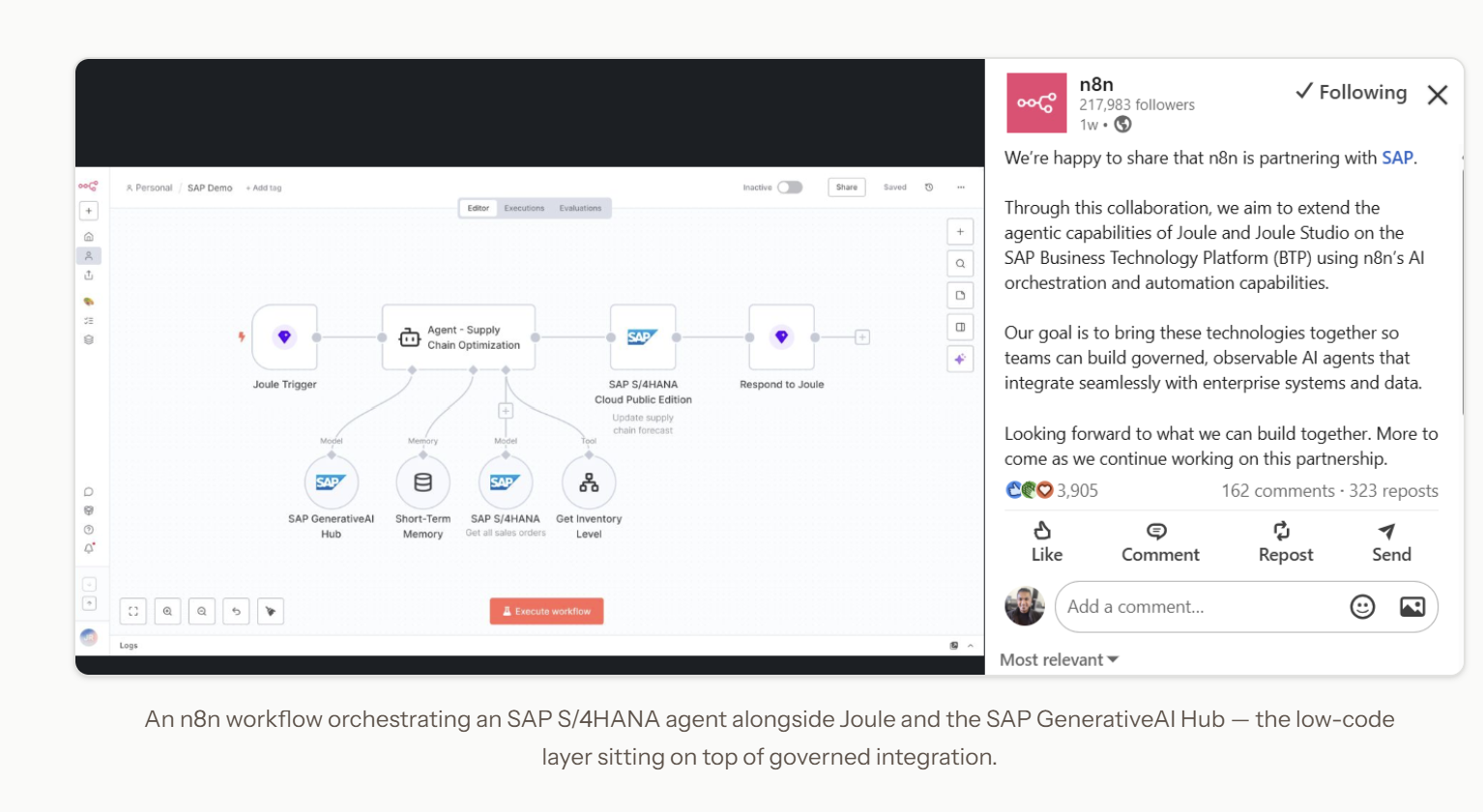
In May 2026, SAP made a strategic investment in n8n at a $5.2 billion valuation — more than double what the company was worth less than a year earlier — and signed a multi-year deal to embed n8n natively inside Joule Studio on the SAP Business AI Platform. In the same week, Mercedes-Benz announced it was rolling out n8n company-wide across R&D, production, sales, financial services, HR and IT.
Two of the biggest names in enterprise software, both betting on the same tool, in the same week. If you work in SAP Cloud Integration (CPI), that should make you curious — and maybe a little nervous.
Here's the good news: n8n is not coming for your job. It's coming for the work CPI was never designed to do. And once you see how the two fit together, you'll understand exactly why SAP wrote that cheque.
Let me show you — with something you can actually build today.
First, the mental model: two layers, two jobs
The lazy take doing the rounds on LinkedIn is "n8n replaces CPI." It doesn't. SAP's own 2026 roadmap is explicit: Integration Suite stays the governance and trust layer, and n8n becomes the low-code orchestration layer on top of it.
Think of it like this:
| SAP CPI (Integration Suite) | n8n | |
|---|---|---|
| Job | Governed, auditable enterprise integration | Orchestration + reaching the outside world |
| Strengths | Adapters, mappings, security, monitoring, B2B/EDI, transactional reliability | 1,000+ connectors, third-party LLMs, SaaS apps, messaging, human-in-the-loop |
| Where it shines | Moving business-critical data between systems, safely and traceably | Everything around that data — intelligence, notifications, approvals, enrichment |
CPI is the plumbing you trust with the money. n8n is the thing that reads a failure in plain English, asks an LLM what it means, and pings your phone on WhatsApp — because CPI would never (and should never) call an external LLM or a WhatsApp API mid-flow. That's not what a governed integration layer is for.
The new skill isn't picking one. It's knowing which work belongs where.
Let's prove it.
Today's Demo: CPI hands its MPL logs to n8n, and the world opens
Here's a scenario every CPI developer can build today, with nothing but a CPI tenant, a free n8n instance, and an LLM API key. No SuccessFactors. No S/4HANA. No enterprise drama.
The idea: An iFlow runs in CPI and produces a Message Processing Log (MPL) — as every iFlow does. We push that MPL event out to n8n. n8n hands the raw, cryptic log to an LLM, which turns it into a plain-English summary a human can act on, and fires a Slack / Teams / WhatsApp notification.
We'll cover both cases in one flow:
- A completed message → n8n posts a friendly "✅ ran clean" summary.
- A failed message → n8n asks the LLM what broke and who should care, then escalates.
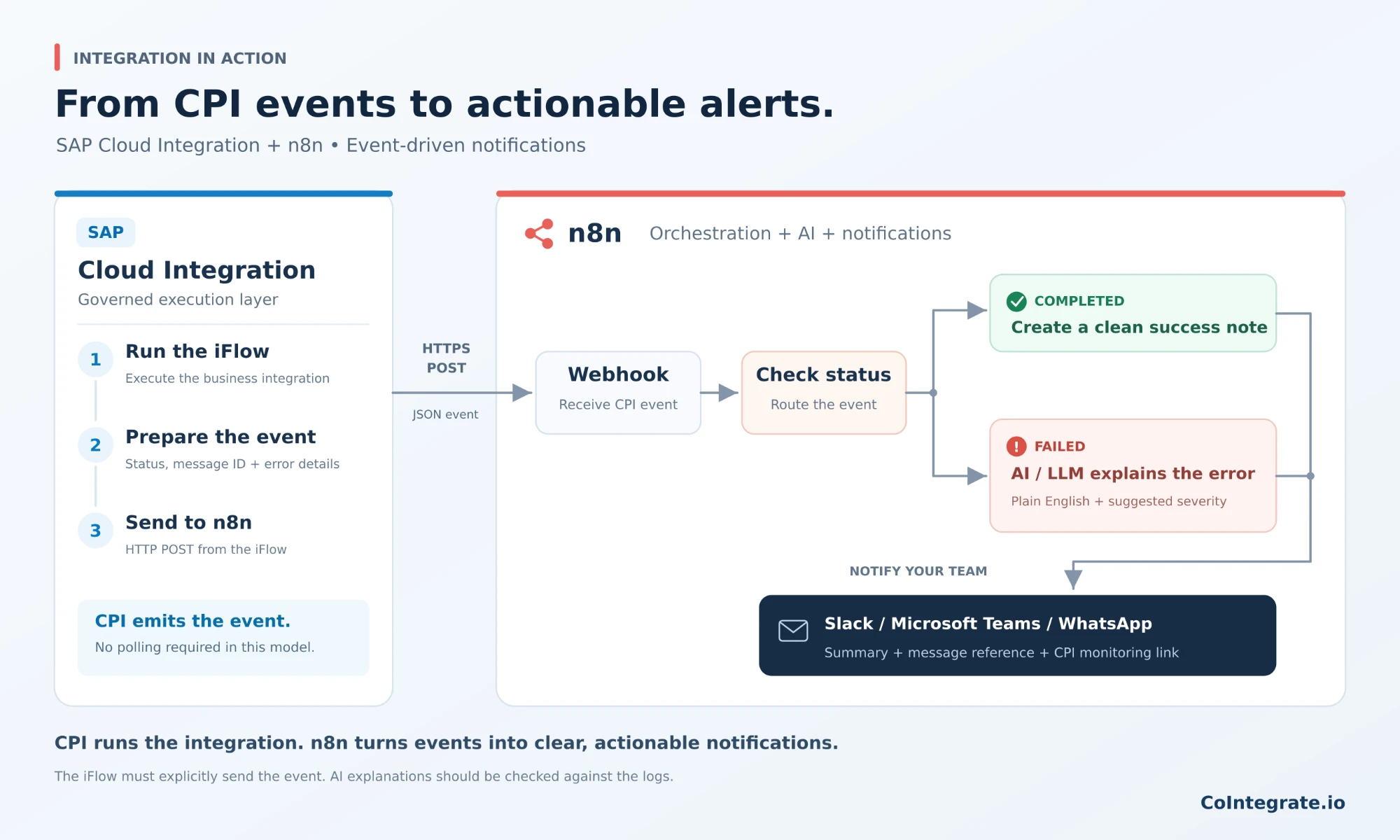
The beauty of this: CPI's job is deliberately humble. It's just the event source. The moment it hands off, n8n reaches places CPI can't.
Part 1 — The CPI side (build it in one prompt with CoIntegrate)
Here's where you skip the hand-coding entirely. Log in to CoIntegrate.io (free — email, no card) and describe the iFlow in plain English. CoIntegrate generates the whole thing — the Groovy, the JSON payload, the exception subprocess, the HTTP call out to n8n — validation-checked, without you opening the SAP Web UI. From there it's minimal setup, the parts only you can do: wire your endpoints, add your credentials, and set the externalized parameters for your landscape.
The prompt to paste into CoIntegrate:
Build me a Cloud Integration iFlow called
MPL_Notifier_Demo.
- Start with an HTTPS sender (or a timer for testing).
- Add a Content Modifier with a simple body so the flow has something to process.
- Add a Groovy step that builds a JSON payload from the message with these fields:
iflowName,messageId(from theSAP_MessageProcessingLogIDheader),statusset to"COMPLETED",timestampin ISO-8601, and an emptyerrorText. SetContent-Typetoapplication/json.- Add an Exception Subprocess that catches any failure, sets
statusto"FAILED", and puts the caught exception text intoerrorText.- End with a Request-Reply step using the HTTP receiver adapter that POSTs the JSON to my n8n webhook URL (I'll supply the URL). Deliver it ready to deploy.
That's it. CoIntegrate hands you the finished iFlow — one flow, one HTTP call out, both the success and failure paths wired. Then the minimal, only-you setup: set your externalized parameters, drop in your n8n webhook URL (you'll get that in Part 2), add any credentials, and deploy.
What CoIntegrate produces for you — so you know exactly what's under the hood:
The Groovy step that builds the notification payload:
import com.sap.gateway.ip.core.customdev.util.Message
import groovy.json.JsonOutput

Message processData(Message message) {
    def headers = message.getHeaders()

    def payload = [
        iflowName   : "MPL_Notifier_Demo",
        messageId   : headers.get("SAP_MessageProcessingLogID"),
        status      : "COMPLETED",              // overwritten to FAILED in the exception subprocess
        timestamp   : new Date().format("yyyy-MM-dd'T'HH:mm:ss'Z'"),
        errorText   : ""                        // populated on failure
    ]

    message.setBody(JsonOutput.toJson(payload))
    message.setHeader("Content-Type", "application/json")
    return message
}
The Exception Subprocess Groovy that flips the status on failure:
def ex = message.getProperty("CamelExceptionCaught")
payload.status    = "FAILED"
payload.errorText = ex ? ex.toString() : "Unknown error"
Sample payload CPI sends to n8n (success):
{
  "iflowName": "MPL_Notifier_Demo",
  "messageId": "AGZx9c2b-8f41-4d7a-b2e0-2b8a1c9d4e55",
  "status": "COMPLETED",
  "timestamp": "2026-09-19T04:12:33Z",
  "errorText": ""
}
Sample payload (failure):
{
  "iflowName": "MPL_Notifier_Demo",
  "messageId": "AGZx9c2b-8f41-4d7a-b2e0-2b8a1c9d4e55",
  "status": "FAILED",
  "timestamp": "2026-09-19T04:15:07Z",
  "errorText": "org.apache.camel.CamelException: 401 Unauthorized calling https://s4.example.com/odata/API_SUPPLIERINVOICE — credential 'S4_BASIC' rejected"
}
Part 2 — The n8n side (where the world opens)
New to n8n? Read this first. What follows are the concepts — how CPI connects to n8n and what each node does — so you understand the pattern. Don't worry about following it click-by-click yet. If you want to actually build it, first jump to "n8n — free and instant" in the "Try it yourself" section below to get n8n running for free (it takes minutes), then come back here and the nodes will make sense as you go.
Now the fun half. In n8n, build this workflow node-by-node. Here's the finished shape you're aiming for:
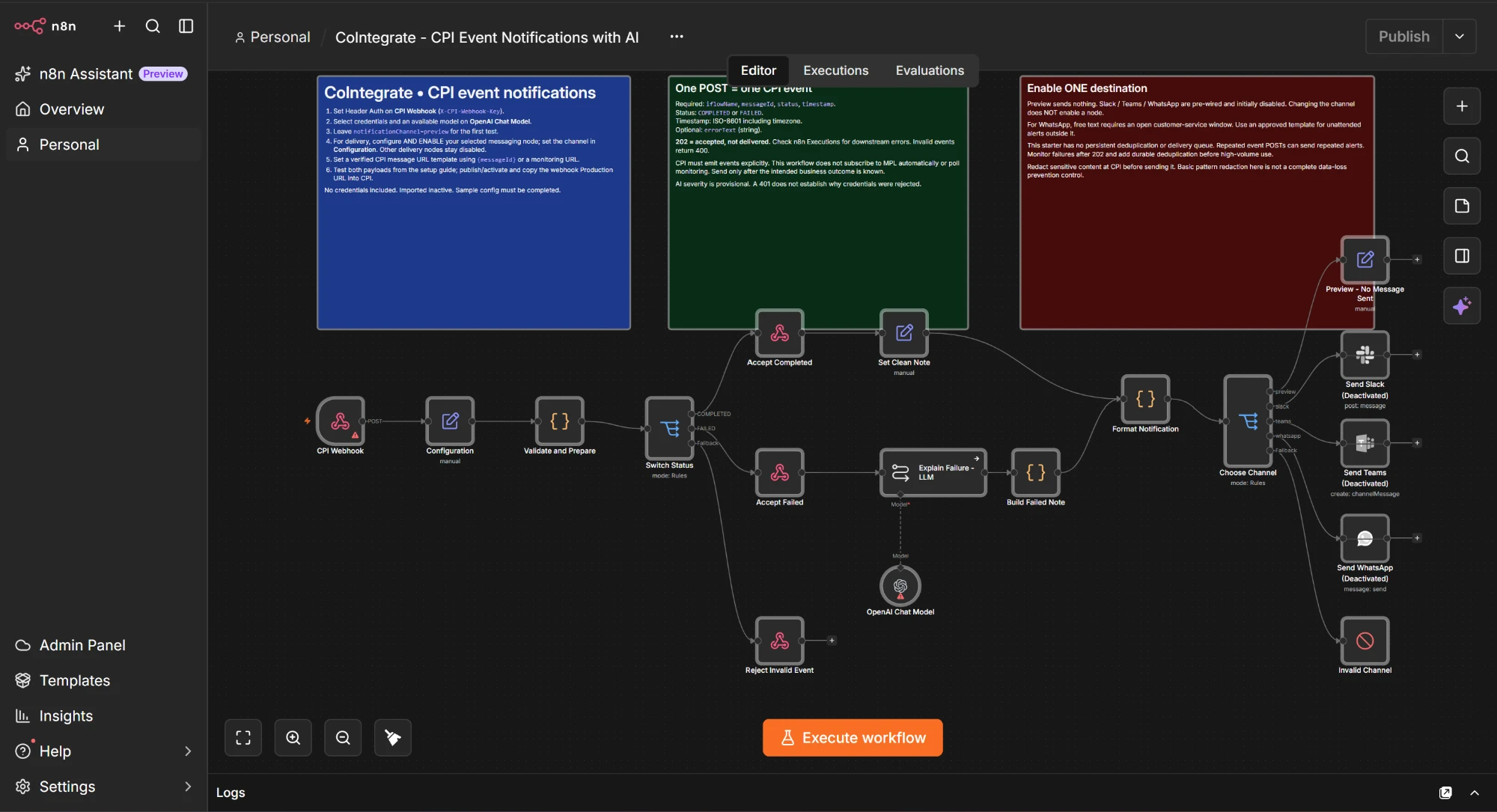
Want to skip the clicking? ⬇ Download this exact workflow as a ready-to-import JSON. In n8n, open Workflows → Import from File and select it. It imports inactive with no credentials — follow the sticky notes inside to set the webhook Header Auth, pick a model, choose one delivery channel, then activate. (If your n8n instance is missing the LangChain, Slack, Teams or WhatsApp nodes, install those community/verified nodes first — that's the usual cause of an import warning.)
1. Webhook node (the trigger)
- Method:
POST - Path:
/cpi-mpl - This gives you a URL like
https://<your-n8n>/webhook/cpi-mpl— that's the URL you put in the CPI HTTP receiver.
2. Switch node (route on status)
- Mode: Rules
- Rule 1:
{{ $json.body.status }}equalsCOMPLETED→ output "OK" - Rule 2:
{{ $json.body.status }}equalsFAILED→ output "Escalate"
3a. On the "OK" branch — Set node
- Compose a light message:
✅ {{ $json.body.iflowName }} ran clean at {{ $json.body.timestamp }} (msg {{ $json.body.messageId }})
3b. On the "Escalate" branch — AI Agent / LLM node (this is the magic)
- Connect your model of choice (Anthropic Claude, OpenAI, or any — n8n is model-agnostic).
- System prompt:
You are an SAP CPI support assistant. Given a raw MPL failure, explain in 2 sentences of plain English what went wrong and who should act. Then output a one-line severity: LOW, MEDIUM, or HIGH.
- User prompt:
iFlow:
{{ $json.body.iflowName }}Error:{{ $json.body.errorText }}
The LLM turns this:
org.apache.camel.CamelException: 401 Unauthorized calling
https://s4.example.com/odata/API_SUPPLIERINVOICE — credential 'S4_BASIC' rejected
...into this:
The MPL_Notifier_Demo interface failed because SAP rejected the login
credential 'S4_BASIC' when posting a supplier invoice to S/4HANA — likely
an expired or rotated password. The CPI/security admin should refresh the
credential in the Security Material store.
Severity: HIGH
That single step is the whole point of the article. CPI produced a cryptic Java stack trace. n8n handed it to an LLM and got back something a human can act on in ten seconds. CPI cannot do that. n8n does it in one node.
4. Messaging node (reach the human)
- Slack node → post to
#cpi-alerts, or - Microsoft Teams node → post to your ops channel, or
- WhatsApp Business Cloud node → message the on-call number.
- Message body: the LLM's plain-English summary + severity + a link back to the message in CPI.
5. (Optional) Second LLM branch — "so what?" Add a second AI node that suggests the fix command or drafts the ticket text. Now n8n isn't just notifying — it's advising.
Run it. Trigger your iFlow successfully → a green note lands in Slack. Force a failure (point the receiver at a bad credential) → within seconds, a plain-English HIGH-severity alert hits WhatsApp. You've just built something that would normally take a monitoring team and a runbook — with two free tools and an LLM.
"Okay, but that's a simple example."
By design. The demo above is a doorway, not the destination. Its only job is to make the pattern click: CPI does the governed work; the instant it hands off, n8n opens the entire outside world — LLMs, SaaS, messaging, validation APIs, human approvals.
In the real world, the two don't have a "primary and a helper." They coexist as equals, each doing serious work the other shouldn't. Here are five richer scenarios that show where this goes. (These are thought-starters — you don't need to build them to feel the shape.)
1. Intelligent supplier invoice concierge
CPI receives the invoice over SFTP, PGP-decrypts it, validates, and posts to S/4HANA via OData — fully auditable. n8n handles the mess CPI can't touch: an LLM reads a badly-scanned PDF invoice, an external tax/VAT API validates the numbers, a sanctions API screens the supplier, and an AP clerk gets a one-click approve/reject on Slack that calls back into CPI to reprocess.
2. Employee onboarding, end to end
CPI moves the new-hire record from SuccessFactors to Employee Central Payroll — governed, mapped, monitored. n8n orchestrates the human world around it: an LLM drafts the personalised welcome email, accounts get provisioned across five SaaS tools, an IT laptop ticket is opened, and the manager is notified in Teams — all triggered by the same event.
3. Order-to-cash with a customer brain
CPI posts the sales order to S/4HANA reliably. n8n adds the intelligence: an LLM reads the inbound customer email for sentiment and urgency, a live shipping-carrier API returns a real delivery estimate, and the customer gets a proactive, personalised update across email and WhatsApp.
4. Exception command-centre
CPI's exception subprocesses across the whole tenant feed n8n, which uses an LLM to classify every failure, route by severity, auto-open or update tickets in ServiceNow/Jira, and escalate only the ones that truly need a human — turning a noisy alert firehose into a triaged queue.
5. Tenant-wide integration observability
n8n continuously reads CPI's MPL data across every iFlow, an LLM summarises the day's integration health, and a plain-English "state of your integrations" digest lands in the leadership channel each morning — no dashboard-clicking, no log-diving.
Notice the pattern in all five: CPI is the trustworthy core. n8n is the reach and the intelligence. That's not competition. That's a $5.2 billion handshake.
Try it yourself — three free doors
Everything in today's demo is free to build. Here's how to get each piece.
1. SAP CPI — via the free BTP account
You don't need a paid licence to experiment. Sign up for a free SAP BTP account, then activate the Integration Suite / Cloud Integration capability from your subaccount:
- Go to SAP BTP Free Tier / Trial and create your account.
- In your subaccount, add the Integration Suite service and activate the Cloud Integration capability.
- Note: trial and free-tier tenants are time- or scope-limited by SAP and are meant for learning, not production — but they're perfect for building this demo.
2. n8n — free and instant
- Self-host the open-source edition (Docker, one command), or use the n8n cloud free trial to skip setup entirely.
- Either way you get the full node library — Webhook, Switch, AI Agent, Slack, Teams, WhatsApp — at no cost.
- (n8n is also coming natively inside Joule Studio — SAP is targeting Q3 2026 — as a fully managed environment. But when it reaches your desk depends on your enterprise's SAP licensing and roadmap.)
- Update — it's here. You asked whether we'd build this kind of n8n-style orchestration right into CoIntegrate. We did. Describe a workflow in plain English and get a checked, ready-to-import n8n file — no waiting on a rollout. See what's new →
3. CoIntegrate — build the CPI half in plain English, free
The hardest part of this whole demo is building the CPI iFlow. Get one adapter or version wrong and it won't even load in the editor. And if you ask a normal AI chatbot to build it, you get a broken flow that fails when you try to use it.
That's the problem CoIntegrate solves. You describe the iFlow in plain English, and CoIntegrate builds it for you — correct, tested, and ready to deploy. Take it as a local ZIP, or push it straight to your BTP tenant. From there you do the final touches only you can do — set your externalized parameters, add your credentials and security material, and configure the endpoints for your landscape. CoIntegrate can also read your MPL logs, tell you the real reason a message failed, and suggest the fix — all from the same screen.
Sign up free — email only, no card — at CoIntegrate.io.
The takeaway
SAP didn't spend $5.2 billion because n8n replaces Integration Suite. They spent it because n8n does the one thing a governed integration layer was never meant to do: reach out and touch the entire world — every LLM, every SaaS app, every messaging channel, every human in the loop.
CPI runs it. n8n opens it. And the developers who win the next few years will be the ones who can build both halves — fast.
Start with the demo above. Then imagine the five scenarios at scale.
That's what's coming. 🚀
Building SAP CPI iFlows shouldn't be the slow part. CoIntegrate lets you build, deploy, monitor and troubleshoot them in plain English — free to start at CoIntegrate.io. Powered by BotLabHQ.