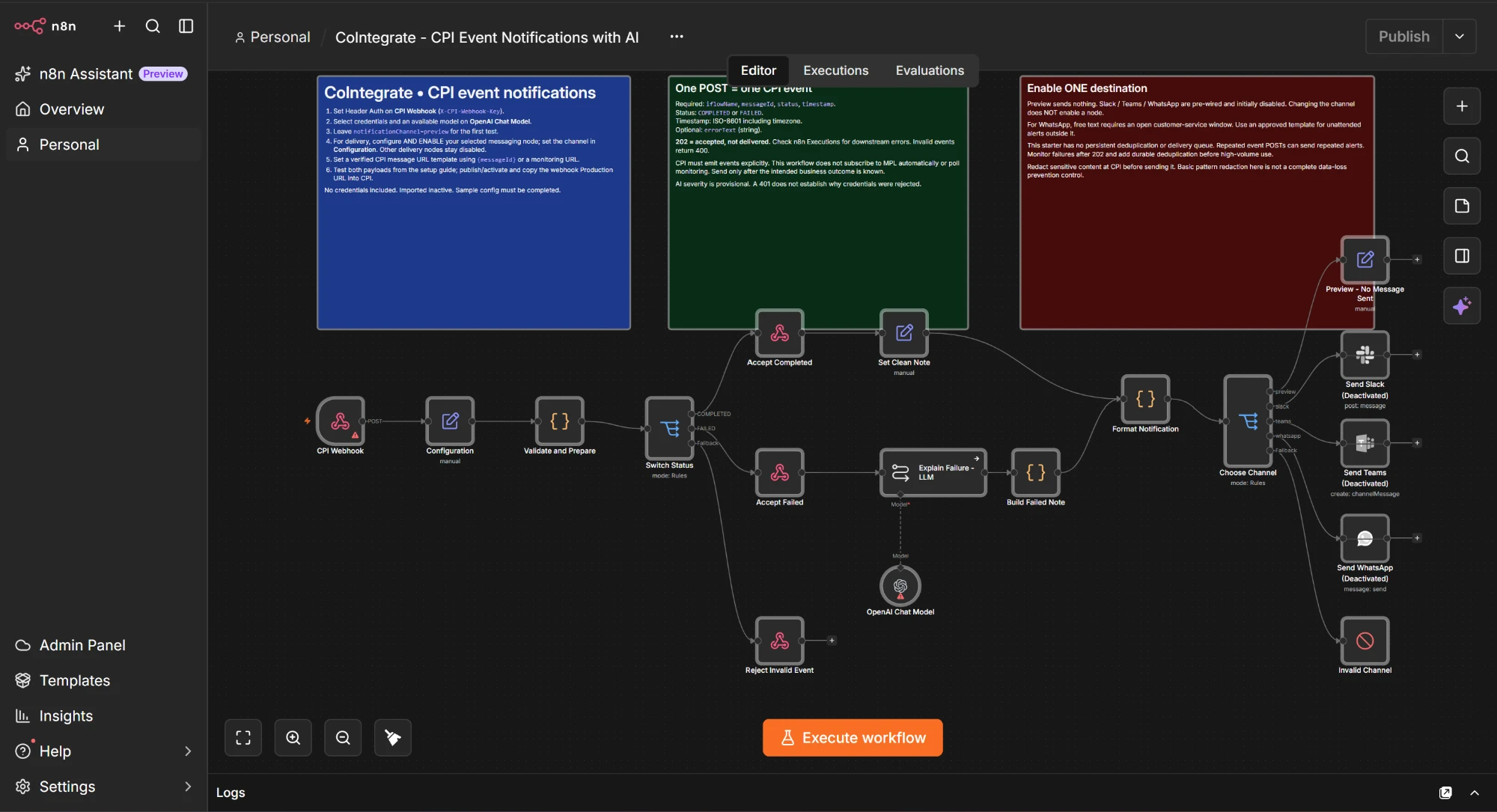
A few weeks ago we wrote about why SAP put money into n8n, and we ended with a question: would you want that kind of plain-English, world-facing orchestration built right into CoIntegrate — so you could use it now instead of waiting on a rollout?
Enough of you said yes. So we built it.
CoIntegrate now has an n8n mode. Describe the automation you want in plain English, and you get back a checked n8n workflow file you import in one click (Workflows → Import from File). No node hunting, no version guessing, no broken JSON.
The two-layer idea, in one line
CPI is the governed core — the integrations that must be reliable, auditable and inside your SAP landscape. n8n is the world-facing layer — the quick automations that reach out to Slack, Teams, WhatsApp, an LLM, or any of the hundreds of apps a business actually runs on.
You want both. Until now CoIntegrate built the CPI half. Now it builds the n8n half too.
What it does today
- Plain English in, workflow file out. Tell it the trigger, the steps, the AI bit, and where the result goes. It plans in a few bullets, then builds.
- Checked before you get it. Every workflow is validated against n8n's own node catalogue — node types, versions, connections, Code-node syntax, AI sub-node wiring — and small issues are repaired automatically. If something can't be fixed safely, it tells you instead of handing you a file that won't import.
- One-click import. Download the JSON, import it into your own n8n, add your credentials, and switch it on.
- Far lighter on credits than a full iFlow build — n8n mode runs a slim lane, so exploring ideas is cheap.
A good first ask is the one from the last post: a CPI message fails, an LLM explains the failure in plain English, and Slack, Teams or WhatsApp gets the alert. Describe it, and you'll have the workflow in under a minute.
Who gets it
- Free — build two n8n workflows a month, on top of your monthly iFlow. Plenty to try it properly.
- Starter and above — unlimited n8n workflows.
- Tutor & Academy — ask anything about n8n and how it pairs with CPI; building the file is a Starter feature.
Prices and credit allowances haven't changed.
What's next
This is the first step, and we're being straight about where the line is today:
- Paired builds — a CPI iFlow and its matching n8n workflow wired to the same contract, from one description — is what we're building next.
- Push straight to your n8n instance, instead of downloading the file, comes after that.
Both are on the roadmap, not in your hands yet. When they land, they'll show up here first.
Try it
Switch to n8n mode in the composer and describe a workflow. If you don't have an account, it's email only — no card to explore.
Start at CoIntegrate.io.
CoIntegrate lets SAP integration teams build, deploy, monitor and troubleshoot CPI iFlows in plain English — and now generate the n8n workflows that sit alongside them. Free to start at CoIntegrate.io. Powered by BotLabHQ.